The escalation rule
A tolerance error caught at design costs ~$1 to fix. Caught in production it's ~$10; once it reaches the customer, ~$100 — the classic 1-10-100 cost-of-poor-quality curve, and far steeper in regulated industries.
◇ 1D Stack-Up · Worst-Case · RSS · Monte Carlo
Professional-grade variation analysis for the missing middle — the engineers stuck between fragile spreadsheets and $25,000-a-seat simulation suites. It reads your drawings, parses the GD&T, and is fast enough to use before you release the package.
In precision work — aerospace, medical, robotics — variation is inevitable. How you analyze it decides whether parts assemble, what they cost to machine, and how late you find out.
A tolerance error caught at design costs ~$1 to fix. Caught in production it's ~$10; once it reaches the customer, ~$100 — the classic 1-10-100 cost-of-poor-quality curve, and far steeper in regulated industries.
To dodge failures, engineers default to tight tolerances. That pushes parts from standard milling into secondary grinding — quietly inflating machining cost on features that never needed it.
Stack-up is often deferred until the design is frozen, when corrective changes are hardest and most expensive. TolFlow makes it cheap enough to run while you're still dimensioning.
$1 design──┤ $10 production──┤ $100 field ▲ cost of catching it late
Tolerance analysis is bifurcated: free but disconnected on one end, powerful but priced for specialists on the other. Most small-to-medium teams get neither.
| Tool | Tier | Analysis | CAD link | Price | Key limitation |
|---|---|---|---|---|---|
| Microsoft Excel | Universal | 1D, manual | None | In M365 | Transcription errors; breaks on every ECO |
| Five Flute calculator | Startup | 1D, web | None (manual) | Free | No bidirectional CAD link |
| SolidWorks TolAnalyst | Mid | 1D + basic 3D | SW native | In SW Pro/Premium | Clunky; struggles with angles & radii |
| Sigmetrix EZtol | SMB | 1D standalone | Reads PMI | ~$125 / mo* | No full 3D kinematic capability |
| ◇ TolFlow | The middle | 1D WC + RSS + Monte Carlo | Onshape-native | Mid-market | Focused on 1D stack-up (by design) |
| CETOL 6σ (Sigmetrix) | Enterprise | 1D / 2D / 3D | SW, NX, Creo, CATIA | ~$10k–25k / seat* | Cost & complexity barrier for SMBs |
| 3DCS Variation Analyst | Enterprise | 1D / 2D / 3D + FEA | SW, NX, CATIA, Creo | ~$8k–25k / yr* | Needs a dedicated variation specialist |
*Enterprise figures are quote-based industry estimates — none of these vendors publish list prices. EZtol price from a public marketplace listing (1-month, single seat). Figures verified 2026-06-30; full sourcing in the project's competitive research notes.
PTC's Onshape leads cloud-native CAD, but its App Store still has no dedicated tolerance stack-up or variation app. TolFlow docks straight into that gap.
Every result traces back to a source. Nothing is invented.
Deterministic worst-case limits for 100% interchangeability, and probabilistic RSS limits when you want to open tolerances for higher yield — from the same loop.
See the heavy hitters driving your stack so you can loosen non-critical tolerances and cut machining cost where it doesn't matter.
Called a tolerance tighter than the process can hold? TolFlow flags it against standard process-capability data before it reaches the floor.
Go beyond closed-form limits — sample each dimension's manufacturing distribution to estimate real-world yield and Cpk for the assembled gap.
Reads feature control frames straight off the drawing — ⌖0.1 A B becomes a position tolerance with datums A and B, with datum continuity tracked through the stack.
Mark up assemblies and place dimensions Onshape-style — click start, click end, drag to offset. Parts lists and revision history are pulled from the title block.
An acting-identity model with a reviewer workflow: designers approve dimensions, leave feedback, and every action lands in a timestamped audit log.
Each value carries a tag — explicit callout, title-block rule, or a standard like ISO 2768. If a dimension can't be resolved, the engine refuses to guess.
Reports are immutable and SHA-256 checksummed, exported to PDF, DOCX, or XLSX. Recomputation creates a new revision — never a silent overwrite.
Professional worst-case and statistical stack-ups with none of the setup friction — at a price that fits the shop with neither a spreadsheet wizard nor a six-figure tooling budget.
Extracted dimensions are overlaid directly on the source PDF, so you can confirm each one before it enters a loop. Garbage in, garbage out — so the tool pushes back at every step.
Review workflow →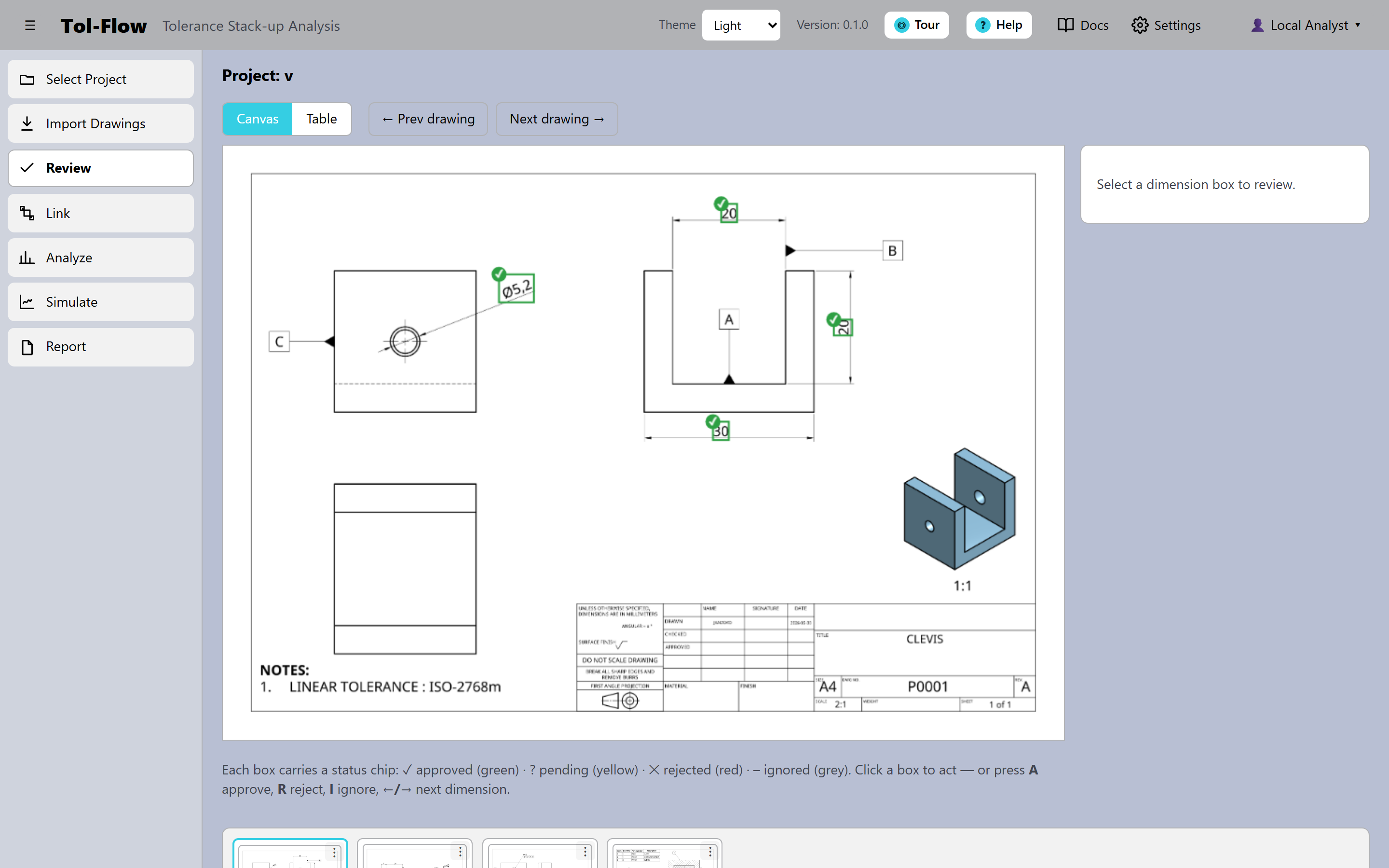
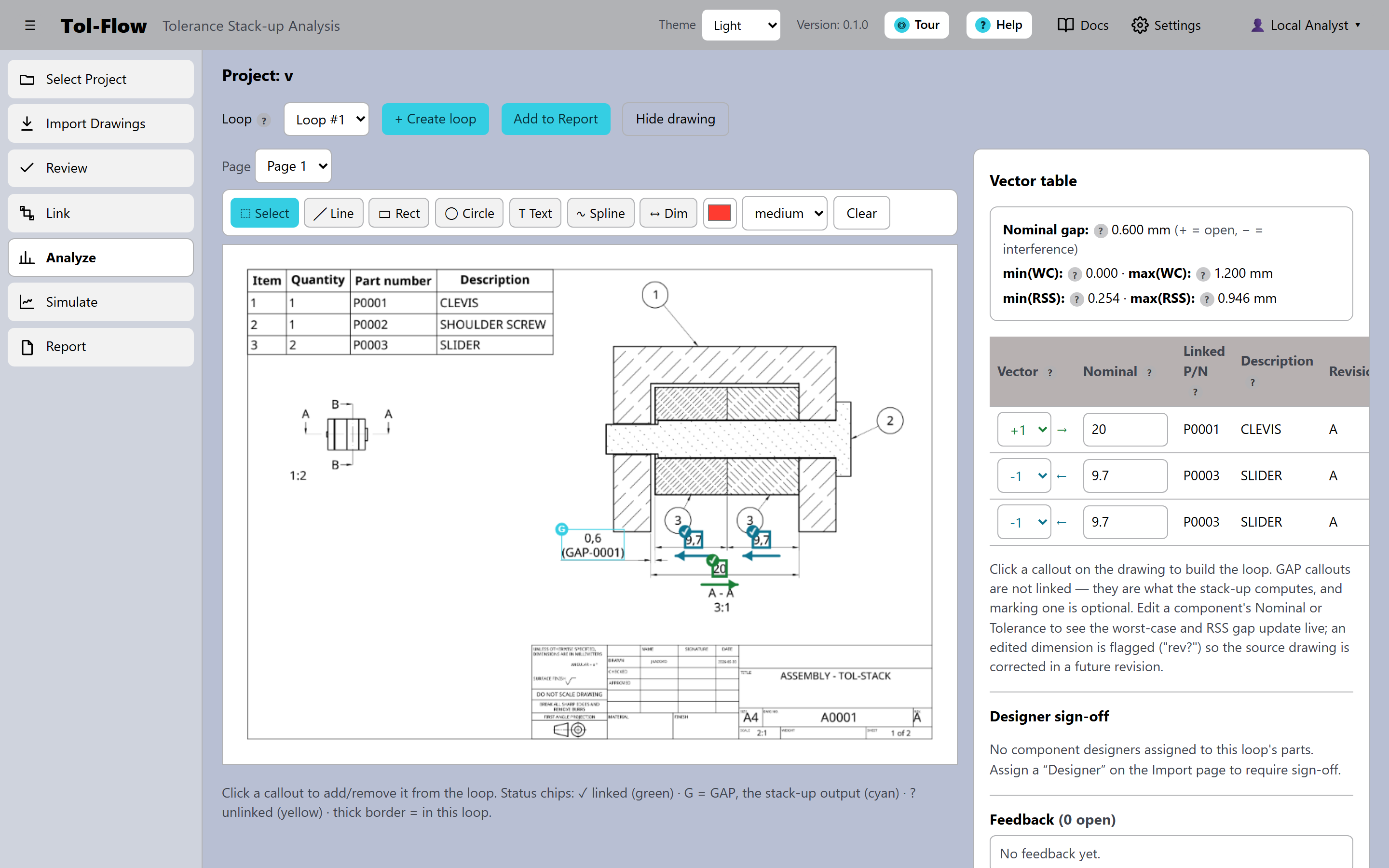
Define the closed dimension loop, and the engine evaluates the worst-case sum and RSS spread with closure checks — warning you when the nominal chain doesn't reproduce the gap callout.
The math, stated exactly →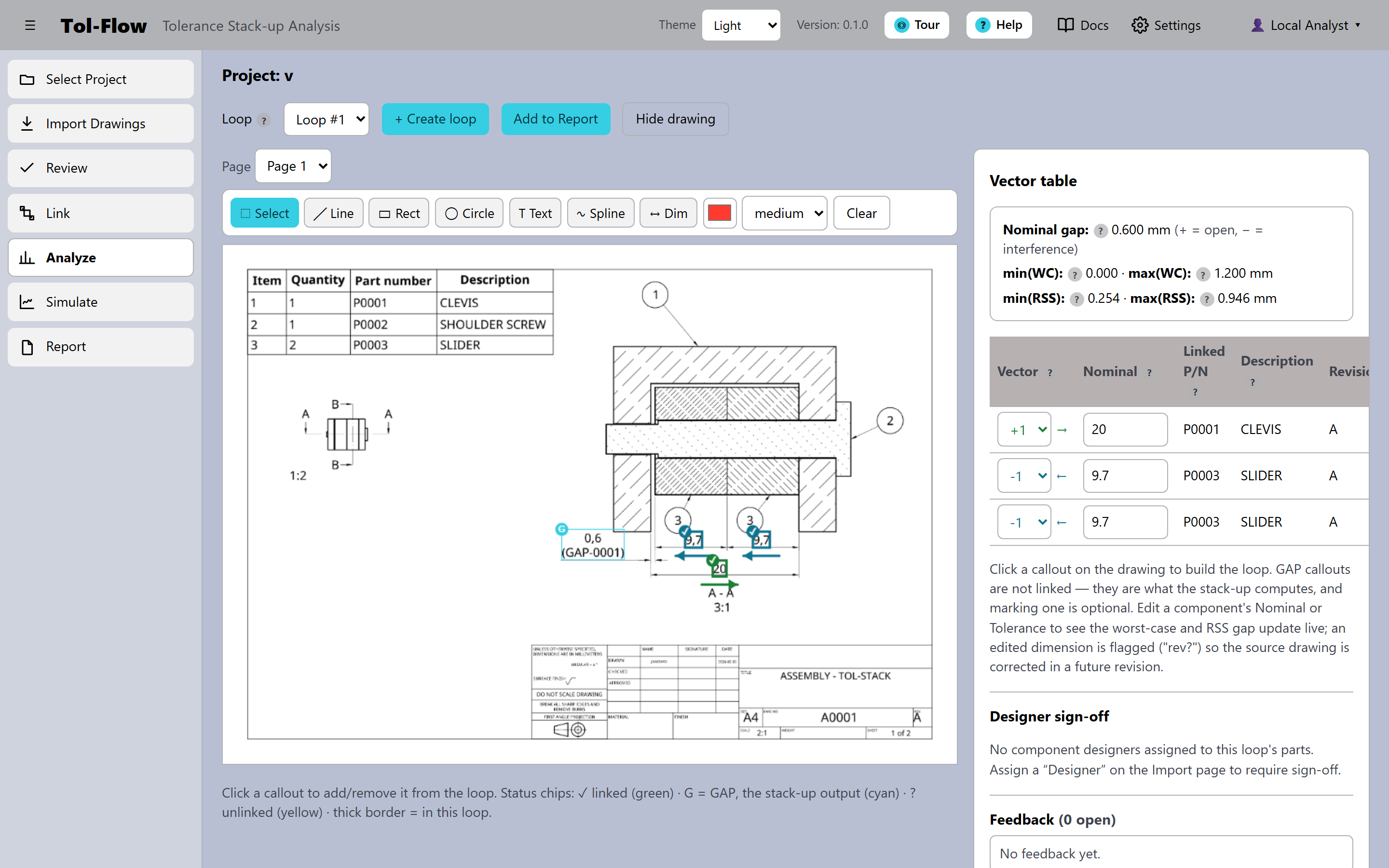
Every analysis exports to an immutable, checksummed report — dimension tables, provenance tags, the assembly image, and the Monte Carlo histogram — ready for a design review or a regulated quality file.
Traceability →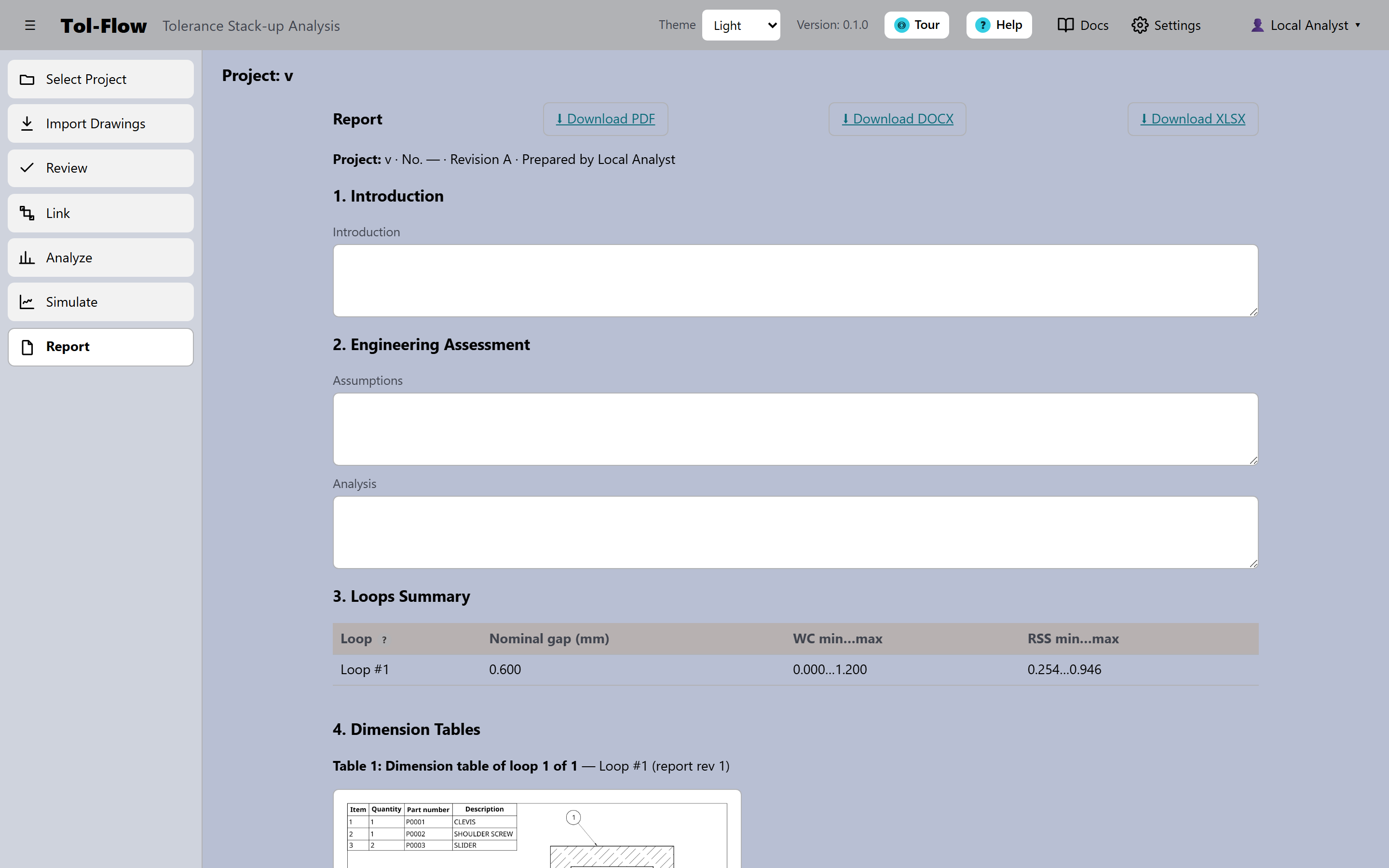
Each step has its own screen — and a Help button that opens the matching guide right beside your work.
Watch the full TolFlow automated pipeline in action.
Choose the level of analysis and collaboration that fits your engineering workflow.
For hobbyists and individual engineers getting started with tolerance loops.
For startups and consulting engineers who need advanced statistical yield analysis.
For engineering organizations and mid-market OEMs requiring reviewer approval and sign-offs.